Veo 3.1 video generator
Veo 3.1 is a video generation model by Google. Create videos up to 8 s in 720P, with audio always included. Official samples and original prompts included below.
- Max8 s
- Resolution720P
- AudioON
- Reference imageOK
Sign in with Google in 1 second — check in daily for free credits (up to 60 a week)What you can do for free →
Generate from a description alone (example: about 60 credits for 6 at 720P). With a reference image it also works image-to-video.
Veo 3.1 example gallery
Official examples and original prompts published by the model developer. Copy them and generate as-is.
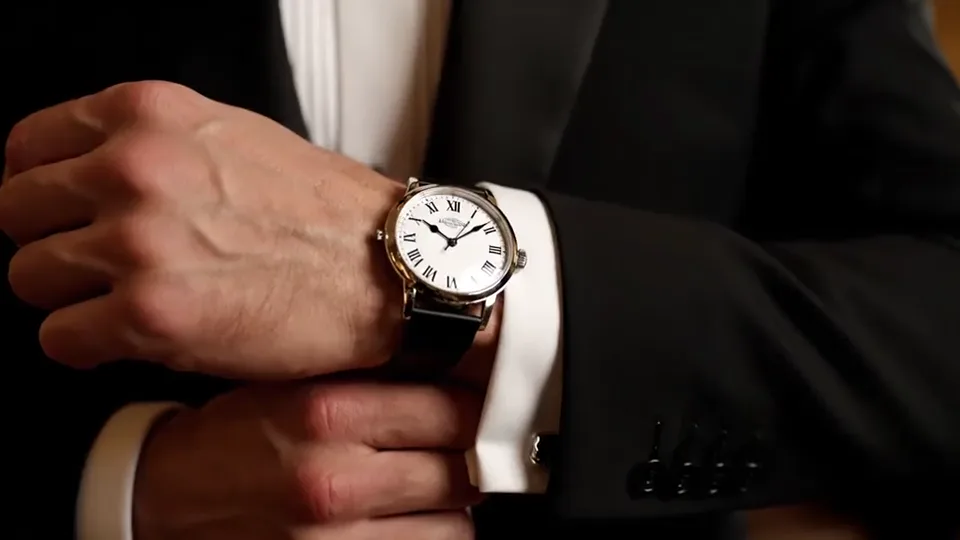
Watch Commercial
A man adjusts his suit cuff before entering an evening gala. His watch catches chandelier light. Start with a close-up of the ticking hands, then slowly pull back to reveal his composed face. Pro brand-film style, 16:9.
Rain Alley Detective
A three-beat detective short: in a rainy alley he whispers that the clues do not add up; he kneels to pick up evidence as rain hits the pavement; then a close-up as he says he found the answer. Thunder and dramatic music, 16:9.
Morning Coffee
At dawn by a window, a young woman sips coffee as sunlight cuts across the table and steam rises from the cup. Pan from her hand to her smile, then to the glowing city skyline outside. Soft native-audio ad mood, 16:9.
Recording Studio
Inside a dim recording studio, two producers argue over a mix: one sits at the console while the other paces. A handheld camera circles them as monitor lights flicker, with bass hum, button clicks, and tense dialogue, 16:9.
What you can make with Veo 3.1
The same look as the official samples, for scenes like these.
Native audio generated with the scene
Veo 3.1 pairs sound with the visual context of the clip — ambient audio, dialogue, effects, footsteps, and surface cues generated in the same pass as the video. For story-driven clips, ads, and social content, the output starts much closer to a finished cut.
4K realism with flexible aspect ratios
The latest Veo 3.1 release supports stunning 4K output plus configurable 16:9 landscape and 9:16 portrait formats. That makes it easier to create one cinematic idea for brand films, product spots, reels, and vertical social placements without rebuilding the brief from scratch.
Stronger realism and prompt adherence
Light, shadow, fabric, camera motion, and real-world physics read more naturally in Veo 3.1. It follows the creative brief more closely, so detailed scene descriptions land with less drift and fewer generic stock-video compromises.
Faster iteration and advanced controls
Veo 3.1 adds updated reference-image capabilities for character and style consistency, plus creative controls for extending clips and creating seamless transitions. Veo 3.1 Fast is tuned for speed and price when you need to test more ideas before choosing the final cut.
Veo 3.1 specs
- Max duration
- 8 s
- Resolutions
- 720P
- Audio
- with audio always included
- Typical credit cost
- ≈ 60 credits (6 · 720P)
Based on this site's offering settings. Credit cost varies with duration and resolution.
Explore other models
Switch between the video generation models in one workspace. Pick by strength — the credit table below has the cost.



Veo 3.1 pricing
Credits by resolution and length.
| Resolution | Per second | 4s | 8s |
|---|---|---|---|
| 720P | 10 | 60 | 80 |
Estimates based on this site's settings. Audio and reference media may change the amount.
Buy credits and generate right away.
See plansVeo 3.1 FAQ
What is Veo 3.1?
Veo 3.1 is a video generation model by Google. It creates videos up to 8 s in 720P, with audio always included.
How do I use Veo 3.1?
Type a prompt into the generator on this page — the model is preselected, so just press generate. With a reference image, image-to-video works too.
What does Veo 3.1 cost?
Credit cost depends on duration and resolution (example: about 60 credits for 6 at 720P). Daily check-in credits also work.
What kind of videos can Veo 3.1 make?
Like the official samples above: product ads, cinematic shots, anime-style looks and more. You can copy the sample prompts as-is.